Wireless NVR Camera Systems: The Ultimate Guide to Home Security
Introduction – Why Many Homes Are Moving to Wireless NVR Systems
Home security has shifted from single cameras to system-based monitoring. Many households now need coverage across multiple areas rather than one viewing angle.
Wireless NVR camera systems sit between fully wired installations and standalone Wi-Fi cameras. They reduce installation complexity while keeping centralized control and local recording.
This makes them suitable for homeowners who want broader coverage, long-term recording, and simpler setup without running network cables through the entire house.
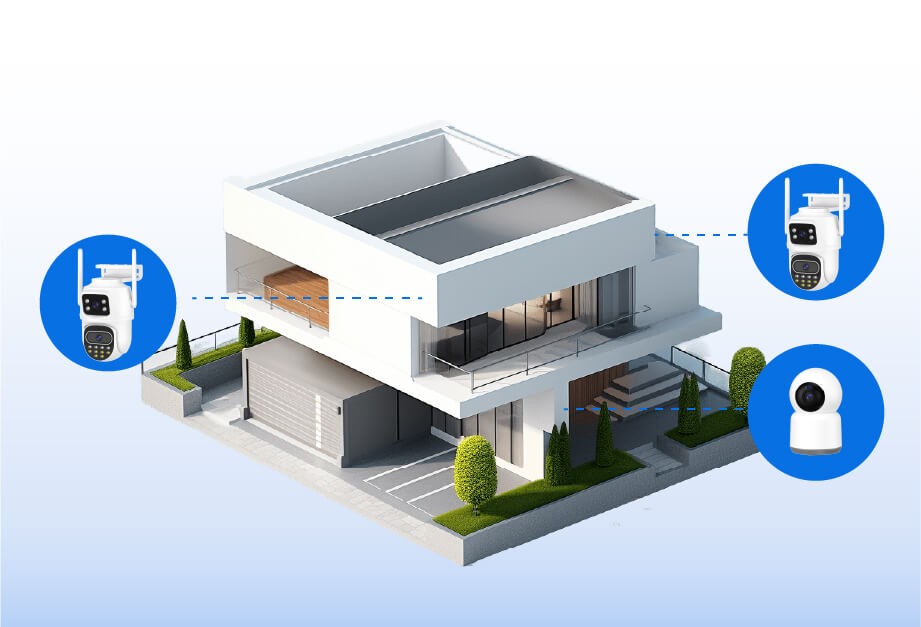
What a Wireless NVR Camera System Is and How It Works
The Main Parts of a Wireless NVR Camera System
A wireless NVR camera system is built around four main elements.
- Wireless IP cameras that send video over Wi-Fi
- A wireless-capable network video recorder
- Local storage installed inside the NVR
- A mobile or desktop app for monitoring and playback
Each component plays a specific role. The NVR acts as the system hub, not just a storage device.
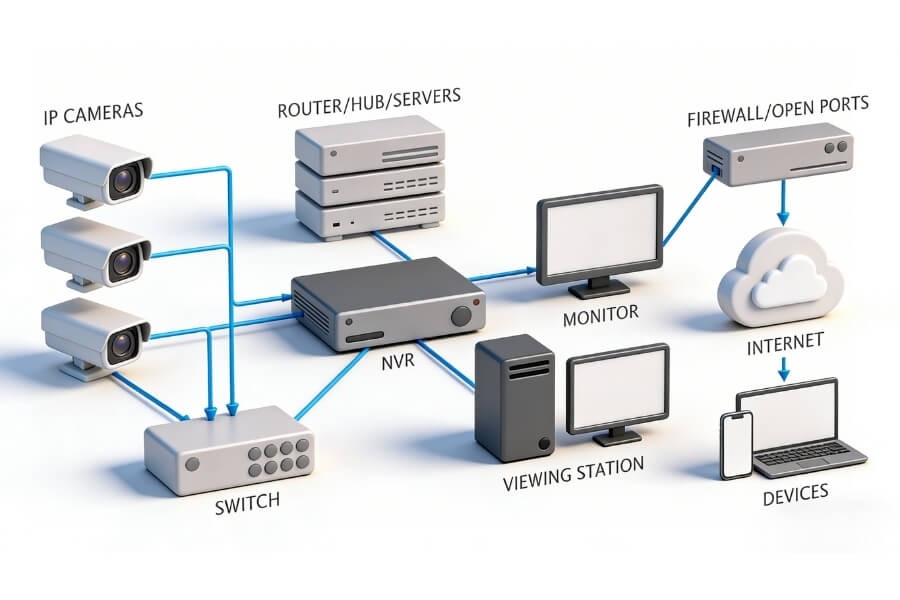
How Cameras and the NVR Work Together
Cameras connect to the NVR through a local Wi-Fi network. Video streams are sent directly to the recorder instead of being stored separately on each camera.
The NVR handles centralized recording, video organization by camera and timeline, and playback across multiple channels.
Users can view live feeds or recorded footage through an app or a connected monitor.
Wireless NVR Compared With Wired Systems and Standalone Cameras
These solutions serve different needs.
Wired NVR systems offer high stability but require extensive cabling. Standalone Wi-Fi cameras are easy to deploy but are managed individually. Wireless NVR systems balance installation flexibility with centralized control.
A wireless NVR system is not designed to replace every wired setup. It works best when wiring is impractical but system-level management is still required.
When a Wireless NVR System Is a Good Fit for Your Home
A wireless NVR system is a practical option when multiple areas need continuous monitoring, managing separate camera storage becomes inconvenient, long-term local recording is preferred, or the property layout limits cable routing.
Please note that overall system performance depends heavily on Wi-Fi coverage. Network planning is an essential part of the decision.
How to Choose a Wireless NVR System That Fits Your Home
How Many Cameras You Actually Need
Start by identifying key areas that require monitoring.
Common residential locations include front doors and entry points, backyards or side yards, garages or driveways, and main indoor shared spaces.
Most homes are adequately covered with four to eight cameras when placed correctly.
Choosing Camera Resolution Based on Real Use
Resolution should match the viewing purpose.
2MP and 3MP cameras are suitable for general indoor and entry monitoring. Higher resolution helps with wider areas but increases storage use.
Wide-angle lenses reduce blind spots, while pan-and-tilt cameras help track movement in open spaces.
For typical residential monitoring, many home users find that 2MP or 3MP cameras provide sufficient detail while keeping storage and network demands manageable, which is why solutions in this range are commonly used in RusinVision residential security camera systems.
What Your Home Network Needs to Support Wireless NVR
Wireless NVR systems rely on stable network connections.
Distance between cameras and the NVR, wall materials, signal interference, router placement, and available bandwidth all affect performance.
In larger homes, network optimization may be required to maintain reliable video transmission.
Understanding Storage and Recording Time
Unlike single Wi-Fi cameras that rely on SD cards, wireless NVR systems store footage centrally.
This allows longer recording retention, easier playback across multiple cameras, and simplified storage management.
Recording duration depends on camera count, resolution, and whether recording is continuous or motion-based.
Features That Make Daily Monitoring Easier
Not all features have equal importance in daily use.
Practical features to prioritize include centralized local recording, support for continuous and motion-based recording, night vision suitable for indoor and outdoor environments, multi-camera live view and synchronized playback, and user access control with alert notifications.
Focus on how features support daily monitoring rather than technical specifications alone.
For home users who prefer local control, a wireless NVR system with built-in local storage can be a suitable option when privacy and long-term access to recordings are important, which is a common design focus in RusinVision home monitoring solutions.
What Installation and Initial Setup Look Like
Getting the System Ready Before Setup
Before setup, place the NVR near the router, confirm Wi-Fi coverage in camera locations, and power on all cameras and the NVR.
A stable network environment reduces setup issues.
Connecting Cameras to the NVR
Most systems support automatic camera discovery. Manual pairing may be needed if cameras are installed far from the recorder.
Common pairing issues include network mismatches and weak signals.
Setting Recording and Remote Access
After pairing, set recording modes, configure storage rules, and enable mobile app access.
Testing live view and playback ensures the system is ready for daily use.
Where to Place Cameras Around the Home
Monitoring Doors, Driveways, and Outdoor Areas
Entrances, windows, and driveways benefit from continuous recording.
This allows users to review activity over longer periods rather than relying only on motion events.
Covering Living Areas and Hallways
Living rooms and hallways require wide coverage.
Cameras placed at higher angles help reduce blind spots and unnecessary triggers.
Using One System for Indoor and Outdoor Monitoring
Wireless NVR systems work well in combined deployments.
Outdoor cameras should support weather resistance and reliable night vision. Indoor cameras can focus on coverage flexibility.

Common Issues With Wireless NVR Systems and How to Avoid Them
Wireless NVR systems have practical limits.
Common challenges include insufficient Wi-Fi signal strength, cameras placed too far from the NVR, underestimated storage requirements, and overlooked network security settings.
Important
Wireless NVR systems are not ideal for environments with unstable networks or extreme distances between devices.
FAQ
Is a wireless NVR system completely wireless?
No. Wireless NVR systems transmit video wirelessly between cameras and the NVR, but both components still require a power source. The term “wireless” refers to data transmission, not power supply. Understanding this distinction helps set realistic expectations during installation and placement planning.
Does a wireless NVR system need internet access?
A wireless NVR system can record and store video locally without an internet connection. However, internet access is required for remote viewing, mobile notifications, and off-site management. Local recording continues even if the network is temporarily unavailable, which is a key advantage for reliability.
How many cameras can one NVR support?
Most residential wireless NVR systems support between four and eight cameras, depending on the recorder’s channel capacity. The actual number may also be influenced by camera resolution and recording mode. Always check the NVR’s specifications to ensure it matches your planned coverage needs.
Is local storage safer than cloud storage?
Local storage keeps video data within the home network, giving users direct control over access and retention. It avoids reliance on third-party servers and recurring subscription fees. Many homeowners prefer this approach for privacy reasons, especially when long-term or continuous recording is required.
Can wireless NVR systems be expanded later?
Yes. Most wireless NVR systems allow additional cameras to be added as long as the total number stays within the supported channel limit. Expansion is typically straightforward, making these systems suitable for homes where security needs may grow over time.
What are the disadvantages of a wireless NVR system?
Wireless NVR systems depend on stable Wi-Fi performance. Signal interference, long distances, or thick walls can affect video reliability. They may also offer lower throughput than fully wired systems. Proper network planning is essential to avoid performance issues in larger or complex homes.
Conclusion – Setting Up a Reliable Wireless NVR System at Home
Wireless NVR camera systems are designed for households that want structured monitoring without complex wiring.
They offer centralized management, local recording, and flexible deployment when network conditions are suitable.
The key to a reliable setup lies in proper planning, realistic expectations for wireless performance, and selecting a system that matches the home environment.