Cat5 vs Cat6 for Security Cameras – Complete Installation Guide
Security cameras rely on stable data transmission. Many installations depend on Ethernet cables such as Cat5e or Cat6 to deliver both video and power. However, many users are unsure which cable type is appropriate for their system.
Common questions include:
- What is the difference between Cat5, Cat5e, and Cat6
- Do security cameras require Cat6 cables
- Can Cat5 cables work with CCTV cameras
- How far can Ethernet cables run for surveillance systems
Understanding these topics helps ensure a reliable security setup. This guide explains how Cat5 and Cat6 cables work with IP and CCTV security cameras, how they differ, and how to choose the right cable for your installation.
Why Ethernet Cable Type Matters in Security Camera Systems
The cable used in a security camera system affects how video data travels between devices. Cameras must send a constant video stream to a recorder or network device. If the cable cannot support stable transmission, video quality or reliability may suffer.
In modern systems, Ethernet cables connect cameras to equipment such as:
- PoE switches
- Network video recorders (NVRs)
- Routers
A properly selected cable ensures that video signals reach the recorder without interruptions.
Choosing the correct cable also helps avoid installation problems. Long cable runs, electrical interference, or poor wiring practices can reduce system reliability. Understanding the capabilities of different cable types helps prevent these issues.
Understanding Cat5, Cat5e, and Cat6 Network Cables
Ethernet cables are standardized network cables used to transmit digital data between devices. Security cameras that use network connections depend on these cables to send video streams to recorders or monitoring software.
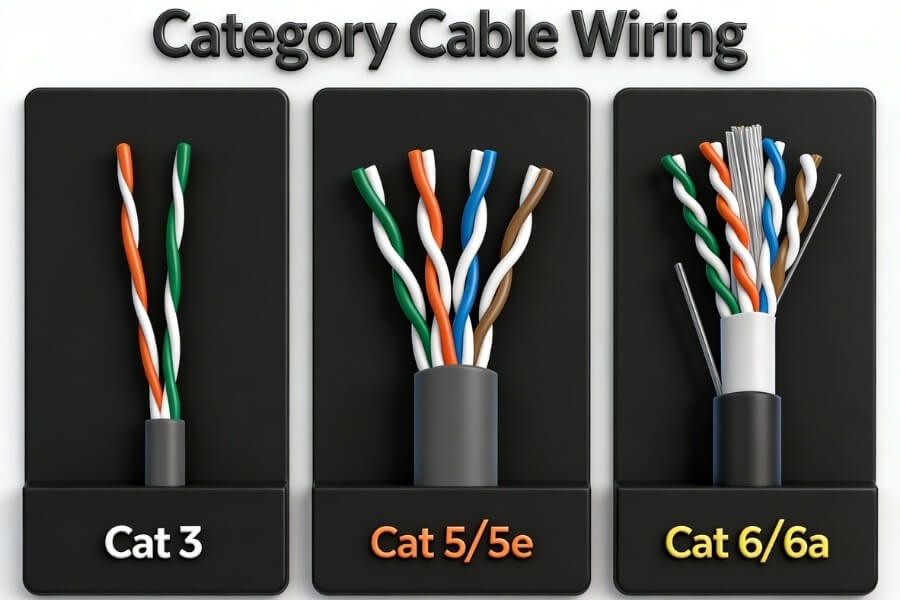
Cat5 Cable – The Early Ethernet Standard
Category 5 cable was introduced in the mid-1990s. It supported network speeds up to 100 Mbps and bandwidth up to 100 MHz.
Cat5 is now largely obsolete. Most modern installations no longer use it because newer standards offer better performance.
Cat5e Cable – The Most Common Network Cable Today
Cat5e stands for Category 5 Enhanced. It improved the original Cat5 design by reducing signal interference between wires.
Key capabilities include:
- Gigabit Ethernet speeds up to 1 Gbps
- Maximum cable distance of 100 meters
- Improved resistance to signal crosstalk
Cat5e remains widely used in homes and small offices. It provides enough performance for most security camera systems.
Cat6 Cable – Higher Performance Ethernet Cabling
Cat6 is a newer standard designed to increase network bandwidth and reduce interference.
Typical features include:
- Up to 10 Gbps speeds for short cable runs
- Bandwidth up to 250 MHz
- Improved internal structure to limit signal interference
Cat6 provides higher bandwidth and improved resistance to signal interference.
Cat6 cables often include thicker conductors and additional internal separation between wire pairs. These improvements help maintain signal quality in high-performance networks.
How Cat5 and Cat6 Cables Work with IP Security Cameras
Many modern security cameras use Power over Ethernet (PoE) technology. PoE allows a single Ethernet cable to carry both electrical power and network data.
This means one cable can handle two functions:
- providing power to the camera
- transmitting video data to a recorder
A typical connection structure looks like this:
Camera → Ethernet cable → PoE switch or PoE NVR → Router → Monitoring device
In this configuration, the PoE device supplies electrical power through the Ethernet cable while also receiving video data from the camera.
This design offers several practical advantages.
First, installation becomes simpler because fewer cables are required. Second, cameras can be placed in locations where electrical outlets are not nearby. Finally, wired connections provide stable transmission compared with wireless systems.
For installations that require continuous monitoring, PoE cameras often provide a dependable solution.
Cat5e vs Cat6 – Which Cable Is Better for Security Cameras
When discussing Ethernet cables for surveillance systems, the comparison usually focuses on Cat5e and Cat6 rather than the original Cat5.
Both cables use the same RJ45 connectors and can connect to the same network equipment. However, they differ in performance capacity.
| Feature | Cat5e | Cat6 |
|---|---|---|
| Maximum speed | 1 Gbps | Up to 10 Gbps (short runs) |
| Bandwidth | 100 MHz | 250 MHz |
| Typical use | homes and small offices | higher-performance networks |
| Cost | lower | slightly higher |
Although Cat6 provides higher bandwidth, most security cameras do not require extremely high network speeds. This means Cat5e is often sufficient for typical surveillance systems.
Cat6 becomes more relevant when a network includes many devices, higher video resolutions, or long-term infrastructure planning.
How Much Network Bandwidth Do Security Cameras Need
Many users assume that security cameras require large amounts of network bandwidth. In practice, most cameras use relatively modest data rates.
Typical bandwidth requirements are approximately:
| Camera Resolution | Estimated Bandwidth |
|---|---|
| 1080p (Full HD) | about 5 Mbps |
| 4MP | about 10 Mbps |
| 4K (Ultra HD) | about 30 Mbps |
Even a high-resolution 4K camera typically uses far less bandwidth than the 1 Gbps capacity supported by Cat5e.
This means Cat5e can usually support multiple cameras on the same network without difficulty.
Higher bandwidth cables such as Cat6 mainly provide additional capacity for future expansion or complex installations.
How Far Can Ethernet Cables Run for Security Cameras
Ethernet cables follow a standard maximum transmission distance.
The recommended limit is:
100 meters (328 feet)
Beyond this distance, signal strength may degrade. Video streams may become unstable or fail entirely.
If the required cable run exceeds 100 meters, several solutions are available:
- install a network switch midway to extend the connection
- use PoE extenders to increase cable reach
- convert the connection to fiber optic cable for long distances
Planning cable routes carefully during installation helps avoid exceeding these limits.
IP Cameras vs Traditional CCTV – Key Wiring Differences
Traditional CCTV systems use analog technology. Their wiring method differs from modern IP camera systems.
Analog CCTV cameras usually require two separate cables:
- a coaxial cable to transmit video
- a power cable to supply electricity
This means each camera requires more complex wiring.
IP security cameras simplify installation because they use a single Ethernet cable for both power and data.
In some situations, analog cameras can also use Cat5 cables through devices called video baluns. These devices convert the analog video signal into a format suitable for twisted-pair cables.
This method allows existing Ethernet cables to carry analog camera signals over longer distances.
However, many installations are moving toward IP cameras because they offer simpler wiring and easier network integration.
Should You Use Cat5e or Cat6 for Security Cameras
Selecting the correct cable depends on the environment and the system requirements.
For Typical Home Security Systems
Most residential installations work well with Cat5e cables. The available bandwidth easily supports common camera resolutions and recording systems.
For Larger Camera Systems
Systems with many cameras or higher-resolution streams may benefit from Cat6 cables. Additional bandwidth can help support future upgrades.
For New Construction Projects
When installing cables inside walls during construction or renovation, Cat6 is often recommended. The cost difference between Cat5e and Cat6 is relatively small compared with the effort required to replace cables later.
For Environments with Electrical Interference
Industrial environments or locations with significant electrical equipment may introduce signal interference. Shielded Cat6 cables can help reduce these effects.
Selecting the right cable during planning helps ensure that the surveillance system remains reliable over time.
Best Practices for Installing Ethernet Camera Cables
Correct cable installation plays an important role in system reliability.
Several guidelines can help improve installation quality.
First, avoid running Ethernet cables alongside high-voltage electrical lines. Electrical interference can reduce signal quality.
Second, prevent tight cable bends or excessive pulling force. Ethernet cables contain delicate twisted wire pairs that may be damaged by sharp bends.
Third, use weather-resistant cables when running wires outdoors. Outdoor-rated cables include protective jackets that resist moisture and sunlight.
Finally, protect exposed cables with conduit if they are buried underground or installed along exterior walls.
Careful installation helps maintain consistent video transmission and reduces maintenance issues.
When Wireless Security Cameras Make More Sense
Running Ethernet cables may not always be practical. Some buildings cannot easily accommodate new wiring.
Wireless cameras may be appropriate in situations such as:
- rental apartments
- temporary monitoring setups
- locations where drilling or wall modifications are restricted
For example, RusinVision indoor Wi-Fi cameras allow monitoring without Ethernet wiring. These cameras connect directly to a home router and can be managed through a mobile application.
Some installations may combine wired PoE cameras for outdoor monitoring and wireless cameras for indoor areas where running cables is difficult.
This approach simplifies installation while still providing indoor monitoring capabilities.
Wireless cameras may not replace wired systems in every scenario, but they offer a convenient option where cable installation is difficult.
FAQ
Are Cat5 and Cat6 connectors the same?
Yes. Both cable types use standard RJ45 connectors and fit the same network ports. However, connectors designed for the matching cable category are recommended to maintain stable signal transmission and full network performance.
Is Cat5e enough for 4K security cameras?
Yes. Most 4K security cameras use around 25–30 Mbps of bandwidth. Cat5e supports up to 1 Gbps transmission, which provides sufficient capacity for several cameras operating on the same network.
Should I install Cat6 for a new surveillance system?
Cat6 cables offer higher bandwidth and better resistance to signal interference. They can support future network upgrades and larger camera systems, making them a practical option when installing new wiring.
Can Cat5 cables work with older CCTV cameras?
Yes. Cat5 cables can transmit analog CCTV signals when used with video baluns. These adapters convert coaxial video signals into a format suitable for twisted-pair network cables.
Which is better Cat5 or Cat6 for CCTV systems?
Both cables can support security cameras. Cat5e is sufficient for most installations, while Cat6 provides additional bandwidth and improved signal stability for larger or more complex systems.
What is the price difference between Cat5 and Cat6?
Cat6 cables typically cost slightly more than Cat5e because they use thicker conductors and improved shielding. However, the difference is usually small compared with the total installation cost of a surveillance system.