Security Camera Power Supply – What You Need to Know
Why Power Supply Is Critical for Camera Stability
Before choosing a security camera, confirm how it will be powered. Stable power is required for continuous recording, network transmission, and night vision. Incorrect or unstable power can cause image flickering, weak infrared performance, or unexpected reboots, and may damage the camera over time.
How to Choose the Right Power Supply for Your Setup
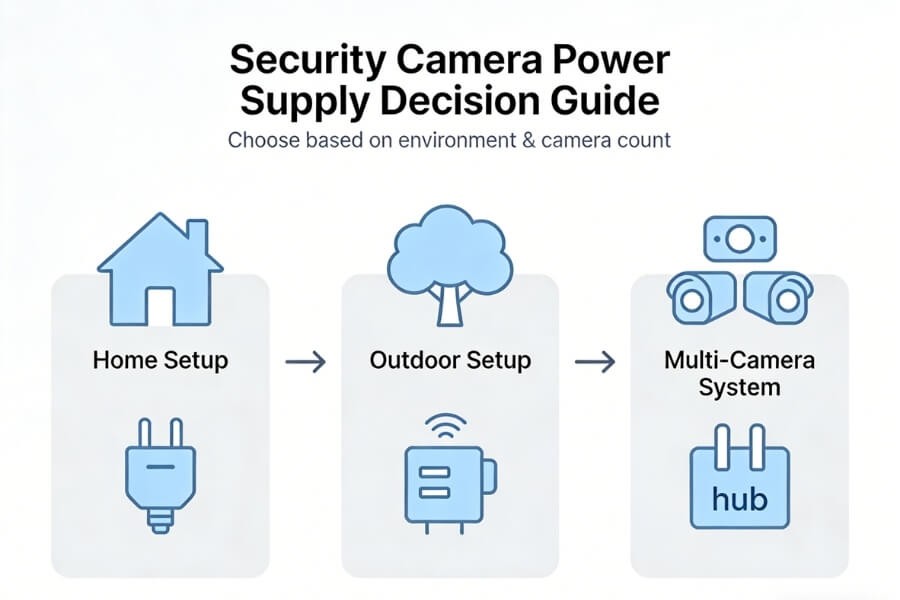
Start with your installation environment. This determines the most suitable power method.
- Choose plug-in (12V DC) if you have a small system and nearby outlets
- Choose PoE if you are installing multiple IP cameras and want fewer cables
- Choose battery or solar if no outlets are available and flexibility is required
- Choose 24V AC if cable runs are long or the system is more demanding
Quick Comparison of Power Supply Options
| Power Type | Best For | Advantages | Limitations |
|---|---|---|---|
| 12V DC Plug-in | Small home setups | Simple, low cost, easy to install | Requires nearby outlet |
| PoE | Multi-camera systems | Single cable, centralized control | Requires PoE switch |
| Battery | Flexible placement | No wiring required | Needs recharging |
| Solar + Battery | Outdoor remote areas | Low maintenance | Requires sunlight |
| 24V AC | Long-distance setups | Less voltage drop | Higher complexity |
Common Security Camera Power Supply Options Explained
Plug-in Power (12V DC)
This is the most common option for residential cameras. It uses a wall adapter and is suitable for fixed indoor or outdoor setups. Always match voltage, ensure sufficient current, and confirm polarity before connecting.
Power over Ethernet (PoE)
PoE delivers power and data through one Ethernet cable. It reduces cable clutter and supports centralized management. A PoE switch or injector is required, and both the camera and network equipment must support PoE standards.
Battery and Solar Power
Battery-powered cameras operate without fixed wiring and allow flexible placement. To extend usage time, install the camera where motion activity is moderate and use solar panels in outdoor areas with consistent sunlight. Solar charging reduces the need for manual recharging.
24V AC Power
24V AC is used in more demanding installations, especially where cable distances are long. It is less affected by voltage drop and is commonly used for PTZ cameras. Polarity is not required, which simplifies wiring.
How to Match Voltage and Current Without Damaging Your Camera
Voltage
Always match the required voltage exactly. Using a higher voltage can damage the camera immediately, while lower voltage may cause unstable operation or failure to start.
Current (Amps)
The power supply must meet or exceed the required current. Higher current capacity is safe, but insufficient current can lead to unstable performance or system shutdown.
How to Calculate Power Requirements for Multiple Cameras
For multi-camera systems, calculate total current before selecting a power supply.
Required current = (camera current × quantity × 1.3) ÷ 0.8
This method ensures the system has enough capacity to handle peak demand and operate reliably.
How to Avoid Voltage Drop in Long Cable Runs
Voltage drop occurs when cables are too long or too thin, which can lead to unstable performance.
Common signs
- Camera reboots
- Weak night vision
- Unstable image
Practical guidelines
- ≤100 ft → 18 AWG
- 100–200 ft → 16 AWG
- 200–300 ft → 14 AWG
- 300 ft → use PoE or 24V AC
AWG refers to cable thickness. Lower numbers indicate thicker cables.
Solutions
- Use thicker cables
- Shorten cable distance
- Use higher voltage systems
- Install power closer to cameras
How to Install Security Camera Power Supply by Setup Type
Plug-in Setup (1–4 Cameras)
Place cameras near outlets, connect the adapter to power, and secure cables properly. For outdoor setups, use waterproof enclosures to protect power connections.
Multi-Camera Setup (Distribution Box)
Select a distribution box based on the number of cameras. Connect it to the main power source, then distribute power to each camera. This simplifies wiring and maintenance.
Battery and Solar Setup
Insert batteries correctly, mount the camera, and install solar panels in direct sunlight. Check battery levels regularly through the system interface to ensure continuous operation.
PoE Setup
Mount the camera, connect the Ethernet cable to a PoE switch, and connect the switch to the router. Use CAT5e or higher cables to maintain stable performance.
Common Power Issues and How to Fix Them
Routine checks
Confirm camera operation, check indicator lights, and monitor battery levels to ensure the system is functioning normally.
Troubleshooting steps
Measure voltage at the camera end, replace adapters to isolate faults, inspect cables and connectors, and check protective components such as fuses.
Safety practices
Use certified power supplies, follow electrical standards, install surge protection outdoors, and ensure proper grounding for system safety.
How to Choose the Best Power Supply for Your Security Cameras
Choose the power solution based on your installation scenario rather than the camera alone. Small systems work well with plug-in adapters, larger systems benefit from PoE or centralized distribution, and flexible environments are better suited for battery or solar solutions. Proper power planning helps ensure stable performance and reduces long-term maintenance issues.
FAQ
What power supply does a security camera need?
A security camera requires a power supply that matches its rated voltage and provides equal or higher current capacity. Check specifications before installation. For multiple cameras, calculate total load and include a safety margin to prevent overload and ensure stable, continuous operation.
What happens if I use the wrong voltage?
Using the wrong voltage can cause immediate and permanent damage to the camera. Overvoltage may burn internal components, while undervoltage can lead to unstable performance or failure to start. Always confirm the voltage rating on the device label and match it exactly before connecting power.
How do I calculate power for multiple cameras?
Add the current requirement of each camera, multiply the total by 1.3 for safety, then divide by 0.8 to account for efficiency loss. This ensures the power supply can handle peak demand and maintain stable performance across all connected cameras.
What is voltage drop?
Voltage drop is the reduction in electrical voltage as power travels through long or thin cables. It can cause cameras to reboot, lose night vision performance, or produce unstable video. Use thicker cables, shorten distances, or switch to PoE or 24V AC to reduce this issue.
Is PoE better than 12V DC?
PoE is suitable for multi-camera systems because it combines power and data in one cable and supports centralized management. 12V DC works well for small setups with nearby outlets. The better choice depends on system size, wiring distance, and installation requirements.
How long do battery-powered cameras last?
Battery life typically ranges from one to six months depending on motion activity, recording frequency, and feature usage. To extend battery life, reduce unnecessary alerts, optimize placement, and consider solar charging for outdoor installations.