Top 3 Single Security Camera Options with or Without NVR & Cloud
Do You Really Need Only One Security Camera
Many users only need to monitor one area, such as a driveway, front door, or living room. A full multi-camera system often adds cost and complexity that is not required.
A single security camera without an NVR or cloud subscription can handle most basic monitoring needs. It simplifies setup and gives you more control over storage.
Can One Camera Cover Your Driveway or Room
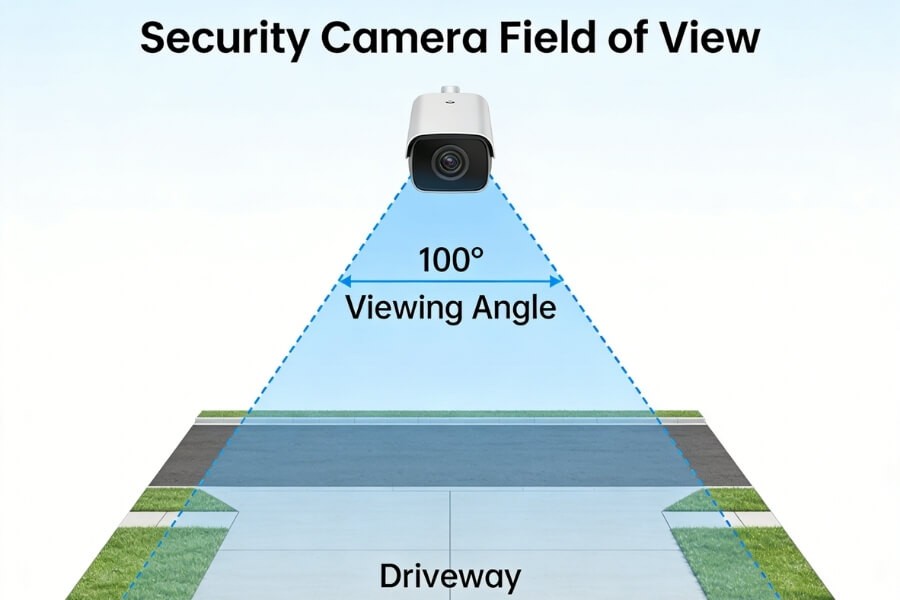
A single camera can cover an area effectively if the viewing angle is suitable.
The key factor is the field of view (FOV), which determines how much space the camera can capture.
- Outdoor areas – Choose at least 100° horizontal FOV
- Indoor spaces – Narrower angles can work, but pan-tilt improves coverage
- Long areas like driveways – Placement is as important as lens angle
For example, a pan-tilt camera with full rotation can monitor multiple directions in one room. Some models, such as those in the RusinVision Home Vision Pro series, support remote control to adjust the viewing angle when needed.
How Long Can a Single Security Camera Store Footage
Recording duration depends on storage size, recording mode, and video settings.
Two common recording methods:
- Continuous recording – Captures everything but uses more storage
- Motion-based recording – Saves only detected events
At 1080p resolution, a 32GB SD card typically stores about 18 hours of continuous footage. With motion detection enabled, storage can last several days or longer depending on activity levels.
Most cameras overwrite the oldest files when storage is full. This allows continuous recording without manual cleanup.
Some systems support AI-based detection to record only relevant events, such as human movement. This reduces storage usage and makes playback easier.
The 3 Best Ways to Use a Single Security Camera
| Option | Storage Type | Best For | Key Benefit |
|---|---|---|---|
| Option 1 | NVR | 24/7 monitoring | Long-term, stable recording |
| Option 2 | SD Card | No monthly cost | Simple and low-cost setup |
| Option 3 | PC Storage | Flexible storage control | Uses existing hardware |
Option 1 – Use an NVR for 24/7 Recording
This setup connects a single camera to a network video recorder (NVR). The recorder stores footage on a hard drive.
Best for situations where continuous recording is required, such as entrances or small business monitoring.
How it works
- Camera connects via PoE or WiFi
- Video is stored on the NVR hard drive
- Recording runs continuously
Advantages
- Large storage capacity, often 1TB or more
- Stable recording over long periods
- Suitable for security-sensitive environments
Things to consider
- Requires additional hardware
- Initial setup is more complex
- Works best when camera and NVR are compatible
For example, if you are monitoring a storefront or need reliable 24/7 recording, pairing a camera with an NVR provides consistent performance.
Option 2 – Use an SD Card for No Monthly Fees
This is the simplest and most cost-effective setup.
The camera stores recordings directly on a microSD card, with no additional devices or subscriptions.
How it works
- Insert an SD card into the camera
- Recordings are stored locally
- Footage can be accessed through a mobile app
Advantages
- No monthly cost
- Easy installation
- Minimal configuration
Recommended setup
- Enable motion-based recording
- Use at least a 64GB SD card
This option works well for monitoring entry points or small areas.
Limitations
- No off-site backup if the camera is damaged or removed
- Storage capacity is limited compared to NVR systems
Some cameras support up to 128GB local storage and allow remote playback through an app.
Option 3 – Store Footage on a PC
This setup uses a computer as the recording device.
It is suitable if you already have a PC running regularly at home or in an office.
How it works
- Camera connects to the same network
- Software records footage to the PC hard drive
- Storage location can be customized
Advantages
- No need for SD card or NVR
- Flexible storage capacity
- Centralized recording management
Things to consider
- The computer must remain powered on
- Setup requires basic software configuration
For example, if you already keep a desktop running, this option allows you to store large amounts of footage without additional hardware.
Which Option Should You Choose
Choose based on how you plan to use the camera.
- If you only want to monitor a front door or driveway – SD card is usually enough
- If you need continuous recording for a shop or entrance – use an NVR
- If you already run a computer for long periods – PC storage is a practical option
For most home users, SD card storage provides the best balance between cost and simplicity.
What Features Actually Matter When Choosing a Camera
Focus on features that directly affect usability and reliability.
- Resolution – At least 1080p for clear identification
- Night vision – Infrared or low-light color support
- AI detection – Helps reduce false alerts
- Two-way audio – Enables communication through the camera
- Installation – Wireless or magnetic mounting simplifies setup
For example, compact cameras with magnetic mounts can be installed quickly without tools. Some RusinVision models use this approach for flexible placement.
Where a Single Camera Works Best
A single camera is most effective when monitoring a defined area.
- Driveway – Track vehicles and visitors
- Front door – Monitor deliveries and entry points
- Living room – Check pets or indoor activity
- Small shops – Cover entrances or checkout areas
Choosing the right placement and storage method improves overall performance.
FAQ
Do I need an NVR for a single security camera?
No. Many single cameras can operate independently using SD card or PC storage. An NVR is only required if you need continuous 24/7 recording or centralized storage management across devices.
What happens when the SD card is full?
When loop recording is enabled, the camera automatically overwrites the oldest footage. This ensures continuous recording without manual deletion or storage management.
How much storage does a single camera need per day?
At 1080p with continuous recording, a single camera typically uses 40–50GB per day. Motion-based recording significantly reduces storage usage depending on activity levels and detection settings.
Will a single security camera affect my network performance?
In normal operation, bandwidth usage is minimal. Network load increases mainly during live viewing or remote playback. Modern compression methods help reduce data usage effectively.
Can a security camera work without internet?
Yes. Cameras can record locally to an SD card or PC without internet. However, remote access, alerts, and cloud features require an active network connection.
Is local storage safer than cloud storage?
Local storage keeps data within your own device, reducing external exposure. Cloud storage provides off-site backup, which helps prevent data loss if the camera is damaged or removed.
Final Thoughts on Choosing a Single Camera Setup
A single security camera is often enough for focused monitoring when it is properly configured.
The most important decision is the storage method. NVR systems provide continuous recording, SD cards offer a simple and low-cost solution, and PC storage allows flexible use of existing hardware.
By matching the setup to your actual use case, you can build a reliable system without unnecessary complexity or ongoing costs.