How to Detect Hidden Cameras
Introduction: Why Hidden Cameras Are a Real Privacy Risk Today
Hidden surveillance devices are no longer uncommon. As camera technology becomes smaller, cheaper, and easier to deploy, covert cameras and listening devices appear more frequently in everyday environments.

Hotels, short-term rentals such as Airbnb, changing rooms, bathrooms, and private offices are spaces where privacy is reasonably expected. Reports and investigations show these same locations are also where hidden cameras are most often discovered.
Surveys indicate that many travelers have encountered or suspected hidden cameras in rental properties. This shows why practical awareness matters more than panic.
This guide outlines a clear, step-by-step process to detect hidden cameras. It explains what to look for, how to check effectively, and what actions to take to protect your privacy.
What Hidden Cameras Look Like and How They Are Disguised
Hidden cameras are designed to blend into their surroundings. Many are extremely small, sometimes no larger than a pinhole, screw head, or button.
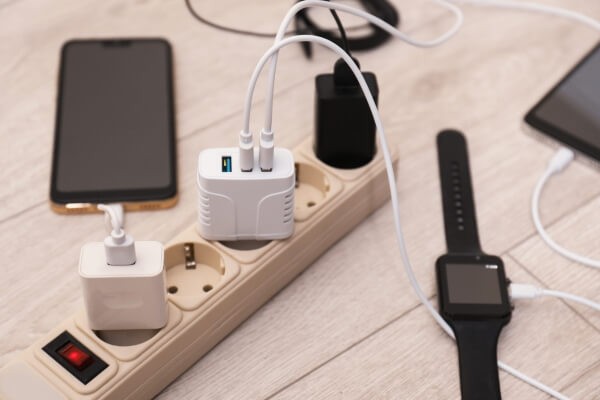
Despite their size, all hidden cameras include the same basic components:
- A camera lens
- An image sensor
- A power source, either battery-based or continuous power
Common Disguises to Be Aware Of
Electronic devices
- Smoke detectors
- Power outlets and wall sockets
- USB chargers and power bricks
- Routers and network equipment
- Clocks and alarm clocks
- TV boxes or streaming devices
Everyday objects
- Books and photo frames
- Tissue boxes
- Stuffed toys
- Desk lamps
- Plant pots
- Pens or small desk items
Structural concealments
- Screws and wall fixtures
- Decorative panels with small holes
- Wall-mounted objects aimed at private areas
- Two-way mirrors
Important: Pay attention to objects that feel out of place, are angled toward beds or bathrooms, or have unexplained wiring or power connections.
How to Detect Hidden Cameras Using Seven Practical Methods
Method 1: Scan the Room for Visual and Physical Clues
Begin with a slow, systematic scan of the room. Focus on objects positioned toward private areas such as beds, showers, or desks.
Look for tiny holes, unfamiliar reflections, exposed wiring, or signs of recent installation. Gently check items for loose parts or components that do not match their purpose.
This method does not detect every device, but it establishes a baseline for all other checks.
Method 2: Use a Flashlight to Spot Camera Lenses
Turn off the lights and darken the room as much as possible. Use a flashlight or your phone’s flashlight to scan suspicious areas.
Shine the light from different angles and watch for small, consistent reflections in blue, green, or purple tones. These reflections may indicate a camera lens. Also look for red or green LEDs that only appear in darkness.
Move slowly. Lens reflections are subtle and easy to miss if rushed.

Method 3: Check the Wi-Fi Network for Unknown Devices
Many hidden cameras rely on Wi-Fi to transmit footage.
In your own space, log in to your router’s admin panel and review connected devices. In hotels or rentals, use a network scanning app such as Fing or Net Analyzer to see what devices share the network.
Look for unfamiliar names, generic labels such as “IP Camera” or “ESP32,” or devices without identifiable manufacturers.
Limitations: Cameras that record locally to an SD card or use cellular networks will not appear in Wi-Fi scans.
Method 4: Use Your Smartphone to Detect Hidden Cameras
Smartphones can assist with basic detection tasks when used correctly.
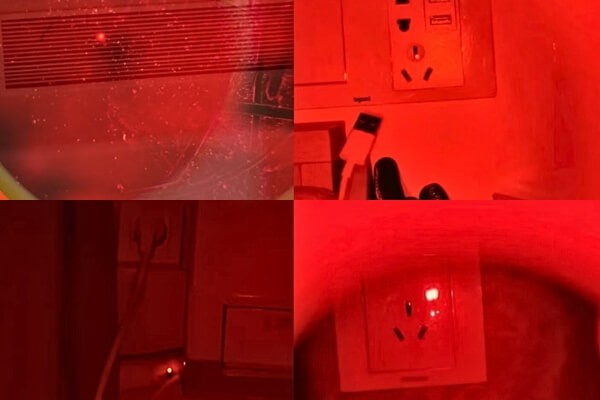
Infrared check:
In a dark room, open your phone’s front-facing camera and scan the area. Small white or purple glowing dots may indicate infrared LEDs used for night vision.
Signal interference test (supporting method):
Make a phone call and walk around the room. Unusual static or signal drops may suggest nearby wireless transmission, though this is not reliable on its own.
Detection apps:
Apps from official app stores can combine infrared checks and network scans. They are useful for initial screening but should not replace physical inspection or dedicated tools.
Method 5: Detect Cameras with RF and Lens Detection Tools
RF detectors identify radio frequencies emitted by transmitting devices. Before using one, turn off Wi-Fi routers, Bluetooth speakers, and other wireless equipment to reduce interference. Slowly scan walls, furniture, and electronics. Alerts such as beeps or flashing lights indicate a signal source.
Lens detectors emit light to locate reflective camera lenses. They can detect both wired and wireless cameras, even when the device is not actively transmitting.
Choose tools based on use frequency. Portable detectors suit travel, while multi-function tools work better for repeated or large-area inspections.
Method 6: Check Mirrors for Two-Way Surveillance
Finger test:
Place your fingertip against the mirror. A normal mirror shows a visible gap between your finger and its reflection. No gap may indicate a two-way mirror.

Sound test:
Tap the mirror lightly. A standard mirror sounds solid and dull. A two-way mirror may sound hollow.
Light test:
Press a flashlight against the mirror. Two-way mirrors may allow more light to pass through.
Method 7: When to Consider a Professional Inspection
Professional inspections are appropriate when privacy risks are high. Examples include long-term rentals, sensitive meetings, or ongoing concerns after personal checks.
Trained technicians use specialized equipment and experience to perform thorough sweeps. For environments requiring consistent privacy protection, scheduled inspections combined with automated visual alerts can help reduce blind spots over time.
What to Do Immediately If You Find a Hidden Camera
Follow these steps carefully and in order:
- Stay calm and do not touch the device. Avoid disturbing potential evidence.
- Block the camera’s view using tape, paper, or fabric.
- Document everything with clear photos and videos.
- Move yourself and personal belongings out of the camera’s field of view.
- Contact law enforcement and follow their instructions.
- Notify hotel management, property owners, or rental platforms.
- Conduct a second sweep. One device may indicate others.
After the situation is addressed, review how the space is monitored going forward, especially in shared or multi-access environments.
FAQ
Q1: What is the simplest way to check for hidden cameras?
The most practical self-check combines a flashlight lens scan with a smartphone infrared check. Turn off the lights, scan for reflective lens glints, then use your phone’s front camera to look for infrared dots.
Q2: Can a cell phone detect a hidden camera?
A smartphone can assist but has limits. It may reveal infrared lights or network connections, but it cannot reliably detect wired or locally recording cameras.
Q3: Do hidden camera detection apps really work?
Detection apps can help with infrared and network checks, but accuracy varies. They are useful for basic screening and should not replace physical inspection or professional tools.
Q4: How do you detect cameras without Wi-Fi?
Cameras that record locally require visual inspection, flashlight lens detection, and dedicated lens detectors. RF detectors are generally ineffective because no signal is transmitted.
Q5: What are common signs of hidden cameras?
Warning signs include small unexplained holes, objects aimed at private areas, unfamiliar electronics, exposed wiring, or reflective glints in low light.
Q6: What if I suspect a camera in a hotel or Airbnb but cannot find it?
A: Request a room change or leave the property if concerns persist. For higher-risk stays, a portable detector can provide additional reassurance.
Q7: Are hidden cameras legal?
In most regions, hidden cameras are illegal in areas where privacy is expected, such as bedrooms and bathrooms. Laws vary by location, but unauthorized surveillance is widely restricted.
Q8: How can I prevent my own cameras from being compromised?
Use physical lens covers, keep firmware updated, enable strong passwords, and review access logs regularly to ensure only authorized users have access.
Conclusion: Staying in Control of Your Privacy
Protecting privacy requires awareness and practical action. Hidden cameras are a real concern, but effective detection does not require constant suspicion.
By understanding common disguises and applying the right combination of visual checks, mobile tools, and detection devices, most risks can be identified early. Select methods based on your environment, from simple flashlight scans to professional inspections.
Maintaining control over your space is about informed preparation and consistent checks. With the right approach, privacy risks can be managed confidently and responsibly.