Camera Not Detecting Motion: Why Is My Security Camera Not Picking Up Motion
Why your security camera is not picking up motion
Many users first notice a problem when something important is missed.
A delivery arrives without a notification. A person walks past the camera at night, but no alert appears.
These situations create a specific kind of frustration. The issue is not false alerts, but missed events. When motion detection fails silently, confidence in the entire security setup drops.
For residential users, reliable motion detection determines whether an indoor security camera provides usable security coverage or simply records occasional activity.
How security camera motion detection actually works
Security cameras do not record everything they see. Motion detection relies on triggers.
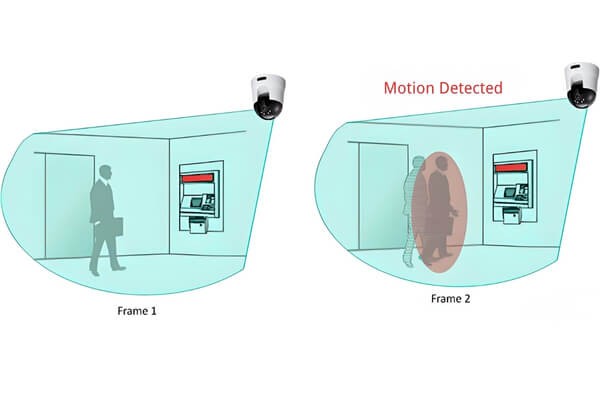
Most systems use one or both of the following methods:
- Optical detection Analyzes changes between video frames. If pixel patterns shift beyond a set threshold, motion is flagged.
- PIR sensors Detect changes in infrared heat. These sensors respond best to warm objects moving across the field of view.
Modern systems increasingly combine these methods with software-based filtering. AI-assisted human detection, adjustable sensitivity, and defined detection zones help reduce false alerts while focusing on meaningful motion.
In many wireless home camera designs, these features balance accuracy, battery life, and processing limits rather than capture every possible movement.
The most common reasons motion detection fails
| Category | Typical causes |
|---|---|
| Settings | Motion detection disabled, sensitivity too low, detection zones not set, notifications turned off |
| Placement | Camera mounted too high or low, incorrect angle, glass or mirrors in front of the lens, blocked field of view |
| Network | Weak Wi-Fi signal, unstable connection, camera too far from the router |
| Power | Low battery, unstable power source, charging issues |
| Environment | Strong backlighting, rain or fog, moving leaves, nearby heat sources |
| System | Outdated firmware, outdated app, cache issues, hardware limitations |
In practice, missed motion is rarely caused by a single factor. It is usually a combination of settings, environment, and device design choices.
How to fix a camera that is not detecting motion
Step 1: Check and adjust motion settings
Start with the basics.
- Confirm motion detection is enabled in the app.
- Set sensitivity to a moderate level, then test.
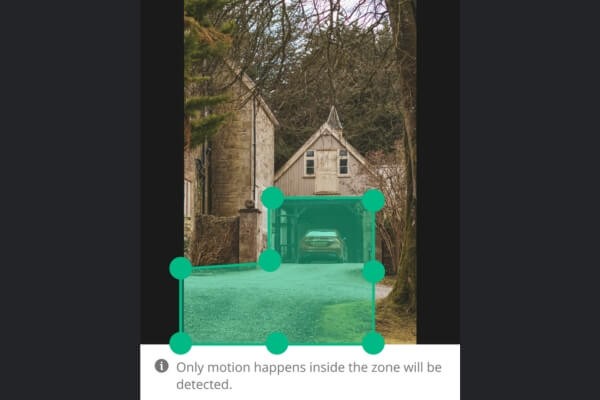
- Define detection zones around key areas only.
- Enable notifications and confirm system permissions.
Small changes in sensitivity or zones often resolve missed events immediately.
Step 2: Optimize camera placement
Physical setup has a direct impact on detection reliability.
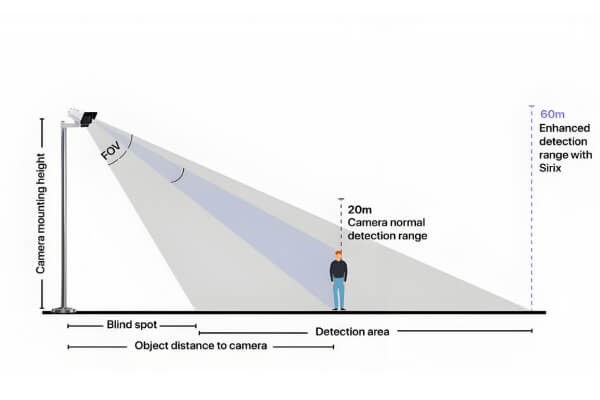
- Recommended mounting height is 2–3 meters.
- Angle the camera downward no more than 30 degrees.
- Avoid placing PIR-based cameras behind glass.
- Keep doors, walkways, and access points within clear view.
Motion moving across the frame is easier to detect than motion moving straight toward the lens.
Step 3: Improve network and power stability
Motion detection depends on consistent system availability.
- Place the camera closer to the router or use a Wi-Fi extender.
- Ensure batteries are fully charged or use a stable power source.
- Restart the router and camera if delays or missed alerts occur.
Battery-powered wireless cameras may introduce short wake-up delays by design.
Step 4: Update and maintain the system
Software stability matters.
- Update camera firmware to the latest version.
- Update the mobile app regularly.
- Clean the lens and sensor area.
- Restart devices periodically to clear temporary system issues.
In long-term deployments, regular maintenance reduces unexplained detection gaps.
Step 5: Test and verify detection
Verification ensures changes are effective.
- Walk through the detection zone at different speeds.
- Review recorded events for completeness.
- Confirm alerts arrive consistently on your phone.
Testing should be repeated after any adjustment.
FAQ
Why does my camera fail to detect motion at night?
Low-light environments reduce motion detection accuracy. Infrared sensors may be blocked, disabled, or operating at low sensitivity. Check that night mode is enabled, ensure the lens and IR emitters are unobstructed, and adjust nighttime sensitivity settings if your camera supports separate day and night controls.
How can I reduce false alerts from moving trees or shadows?
False alerts often occur when detection zones include areas with frequent background movement. Narrow detection zones to focus on key paths, reduce sensitivity slightly, and enable human-only detection if available. This helps filter out motion caused by wind, shadows, or environmental changes.
Why is motion detected but not recorded?
Motion alerts without recordings usually indicate storage or power issues. A full or slow memory card, unstable power supply, or brief system interruptions can prevent footage from saving. Check available storage, use reliable media, and ensure the camera receives consistent power during events.
How can I test if a motion sensor is working correctly?
Walk slowly across the camera’s field of view and confirm both notifications and recorded events appear in the app. Test from different angles and distances. If results are inconsistent, review sensitivity settings and detection zones before assuming a hardware issue.
Why is my security camera not picking up motion?
Missed motion is usually caused by a combination of low sensitivity, poor placement, environmental conditions, or system limitations. Verify motion detection is enabled, adjust camera angle and height, confirm network stability, and update firmware to reduce detection gaps.
Key takeaways for reliable motion detection
Motion detection reliability depends on realistic expectations, correct setup, and ongoing maintenance. Cameras are designed to balance accuracy, power use, and noise reduction rather than detect every movement.
When evaluating indoor monitoring setups, focus on how a system processes motion rather than how often it sends alerts. Features such as AI-based object classification, local storage support, and stable low-power operation can reduce missed events in real-world environments.
In monitoring solutions like those used in RusinVision systems, AI visual analysis helps maintain consistent detection across lighting changes, remote locations, and low-power deployments without relying solely on basic motion triggers.
A well-configured smart indoor monitoring setup does not eliminate all missed events. It minimizes them through informed setup, environment-aware design, and regular verification.