How Do Wireless Security Cameras Work? A Practical Guide for Home Security
Wireless security cameras are widely used in modern home security systems. Compared with traditional wired setups, they are easier to install, more flexible to position, and simpler to manage.
This guide explains how wireless security cameras work, the main types available, and what to consider when selecting one for home use. The focus is on clear explanations and practical use cases rather than promotional claims.

What Does “Wireless” Really Mean in Security Cameras
Wireless security cameras transmit video and audio data through wireless signals rather than physical video cables. Most models still require a power source, such as a wall outlet, USB connection, battery, or solar panel.
Common Misunderstandings
- “Wireless” does not mean the camera operates without any cables.
- The term refers to data transmission, not power delivery.
- Cameras powered by batteries or solar panels with no cables are usually described as wire-free cameras.
Who Are Wireless Cameras Best For
Wireless security cameras are commonly used by:
- Homeowners and families
- Renters and apartment residents
- Users who want simple setup without drilling or rewiring
- Beginners building a smart home system
For indoor security use, wireless designs help keep installations clean and flexible. This is particularly useful in apartments or rental homes where permanent modifications are limited.
How Wireless Security Cameras Work Step by Step
Although designs vary, most wireless security cameras follow the same basic process.
Core Components
- Camera: Captures video and audio
- Wireless module: Compresses and transmits data
- Receiver: Accepts and decodes the signal
- Display device: Phone, tablet, or computer
- Storage: SD card, cloud storage, or local recorder
Data Transmission Methods
- Wi-Fi: The most common option for homes and requires a stable network.
- Cellular: Uses a SIM card and is suitable for locations without Wi-Fi.
- Bluetooth: Short-range communication, typically used for setup or hub pairing.
Basic Workflow
- The camera captures video and audio.
- Data is compressed inside the camera.
- The signal is sent wirelessly.
- Video is received and stored.
- Users view footage remotely through an app.
This two-way communication allows users to receive alerts, adjust settings, and view live video remotely through a connected app.
Different Types of Wireless Cameras and Where They’re Used
Different wireless camera types are designed for different environments.
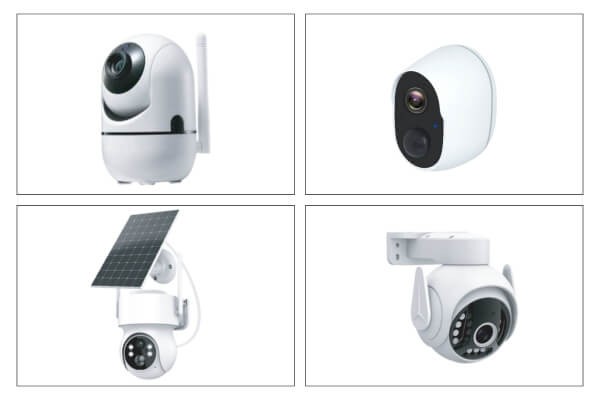
Wi-Fi Cameras
- Common for homes and indoor use
- Require a continuous power source
- Support live viewing and remote access
Battery-Powered Cameras
- Useful where power outlets are unavailable
- Easy to move or reposition
- Typically record only when motion is detected
Solar-Powered Cameras
- Designed for outdoor use with sufficient sunlight
- Reduce the need for frequent recharging
- Suitable for long-term outdoor monitoring
4G / Cellular Cameras
- Operate independently of Wi-Fi
- Use mobile networks
- Often used at construction sites, farms, or remote properties where wired networks are unavailable
For indoor home use, Wi-Fi cameras with simple setup and stable connectivity are generally the most practical option.
Wireless vs. Wired Cameras: Which One Fits Your Home
Both wireless and wired cameras can provide reliable security, but they serve different needs.
| Aspect | Wireless Cameras | Wired Cameras |
|---|---|---|
| Installation | Simple and DIY-friendly | More complex |
| Flexibility | Easy to move | Fixed placement |
| Reliability | Depends on network quality | Very stable |
| Video quality | Bandwidth dependent | Consistently high |
| Security | Network-based risks | Physical connection |
| Best for | Homes, rentals, short-term use | Businesses, permanent setups |
Wireless systems are commonly selected for convenience and placement flexibility. Wired systems are often used where long-term stability and fixed infrastructure are required.
What to Look for When Choosing a Wireless Security Camera
Choosing the right features is more important than selecting the most advanced model.
Video Quality
A minimum resolution of 1080p is recommended. Many indoor cameras use 2MP or 3MP sensors to provide sufficient detail for daily monitoring.
Night Vision
Infrared night vision is standard on most models. Some cameras also support full-color night vision using built-in lighting.
Motion Detection
AI-based human detection helps reduce false alerts caused by pets, lighting changes, or background movement.
Audio
Two-way audio allows users to listen and speak through the camera using a mobile app.
Storage Options
Local SD card storage, often supporting up to 128GB, reduces reliance on cloud subscriptions. Cloud storage can still be used for backup or remote access when needed.
Smart Controls
Mobile apps allow live viewing, alerts, and camera control. Features such as pan and tilt help extend coverage across an entire room using a single device.
For households monitoring both security and daily family activity, a setup that includes AI detection, two-way audio, and local storage can address both needs within one system.
How to Install Wireless Security Cameras at Home
Recommended Placement
- Entry points such as doors and windows
- Living rooms or hallways
- Children’s rooms or areas used for family care
Avoid pointing cameras directly at neighboring properties.
Basic Installation Steps
- Choose a location and test Wi-Fi strength.
- Mount the camera using the included bracket or magnetic base.
- Connect the power source.
- Pair the camera with the mobile app.
- Test video, alerts, and night vision.
Cameras with magnetic mounts allow quick repositioning without permanent hardware or structural changes.
FAQ
Do wireless security cameras need the internet?
Most wireless security cameras need Wi-Fi or cellular connections for remote viewing, alerts, and app control. Some models with local SD card storage can continue recording without constant internet access, but live streaming, notifications, and cloud backup may be limited.
How are wireless security cameras powered?
Wireless security cameras can be powered by wall outlets, USB connections, rechargeable batteries, or solar panels. “Wireless” refers to data transmission, not power. The power method affects installation flexibility, recording behavior, and maintenance frequency.
Do wireless security cameras record all the time?
Continuous recording is usually available only on plug-in wireless cameras. Battery-powered or wire-free models typically record when motion is detected to conserve power. Recording behavior depends on power source, storage type, and motion settings.
Are wireless security cameras vulnerable to hacking?
Wireless cameras can face security risks if not properly configured. Using encrypted connections, changing default passwords, enabling two-factor authentication, and choosing models with local storage options can significantly reduce unauthorized access.
How long do batteries last in wireless cameras?
Battery life commonly ranges from one to six months. It depends on motion activity, recording frequency, video resolution, night vision use, and environmental conditions such as temperature.
What should I check when using a wireless camera outdoors?
For outdoor use, select a camera with at least an IP65 weather rating. Confirm strong Wi-Fi or cellular coverage, suitable operating temperatures, and secure mounting to maintain stable performance in changing weather.
When a Wireless Indoor Camera Is the Right Choice
Wireless indoor cameras offer a practical balance of convenience and functionality.
- Simple installation without rewiring
- Smart detection and remote access
- Flexible placement with pan, tilt, or magnetic mounts
- Local storage options for improved privacy control
- Support for both home security and family monitoring
With clear video, intelligent alerts, and straightforward setup, wireless systems make everyday home monitoring easier to manage and maintain.