How to Choose a 24/7 Security Camera System for Business
A 24/7 security camera system is not just about live viewing. For businesses, it means uninterrupted recording, stable storage, and reliable long-term operation.
This guide explains how to choose a commercial 24/7 security camera system that supports continuous recording without gaps.

What 24/7 Recording Actually Means in Real Business Use
True 24/7 surveillance requires:
- Continuous power
- Stable network connection
- Continuous video recording
- Sufficient storage capacity
Live streaming alone does not guarantee continuous recording.
Many cameras provide real-time monitoring but only record when motion is detected. In retail stores, offices, and warehouses, motion-only recording can create evidence gaps. For business use, recording integrity should be the priority.
Step 1 Decide Where Continuous Recording Is Necessary
Not every area requires full-time recording.
Start by identifying higher-risk zones:
- Entrances and exits
- Cash registers
- Inventory storage areas
- Loading docks
These locations typically require uninterrupted recording.
Lower-risk areas may use motion-based recording depending on internal policies.
Important: Most battery-powered cameras are not designed for true 24/7 continuous recording. Wired or PoE systems are more suitable for commercial use.
Step 2 Choose the Right Power and Connection Setup
Recording stability depends on infrastructure.
PoE Systems
PoE cameras use a single Ethernet cable for both power and data.
Benefits include:
- Stable connectivity
- Centralized power management
- Reduced Wi-Fi dependency
- Scalable multi-camera deployment
PoE systems are widely used in commercial environments.
Wired Non-PoE Cameras
These require separate power adapters. They provide stable performance but increase installation complexity.
Wi-Fi Cameras
Wi-Fi cameras are easier to deploy but rely on signal strength and network capacity. In busy commercial networks, interference may affect recording stability.
For critical zones, wired systems are generally preferred.
Step 3 Choose How Your System Will Store Footage
Recording method determines whether your system truly operates 24/7.
SD Card Storage
SD cards are commonly used for motion-triggered recording. They are useful as backup storage but are not ideal for long-term continuous recording due to limited capacity and hardware wear.
NVR Systems
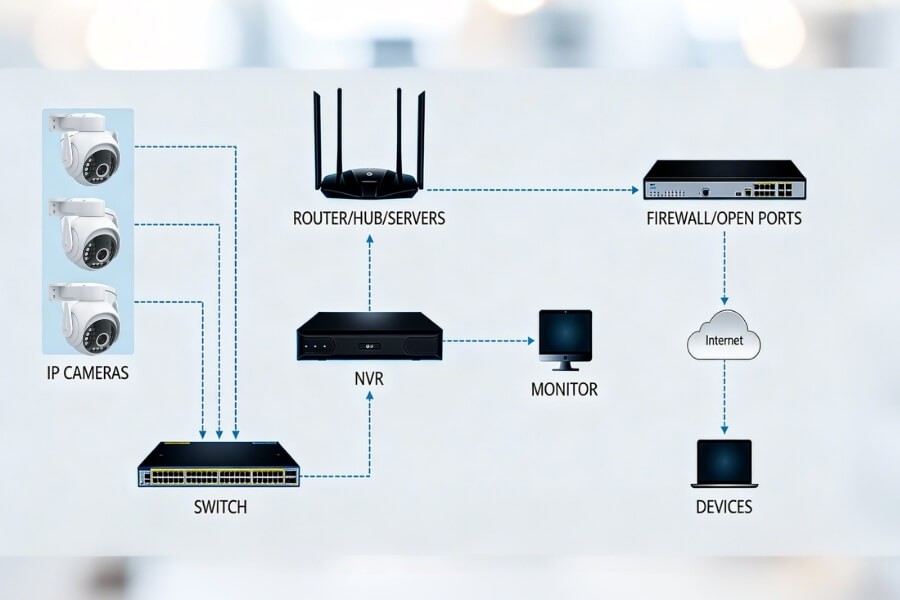
An NVR system is the most common solution for commercial 24/7 security camera systems.
It typically includes:
- Multiple IP cameras
- A centralized recorder
- Built-in hard drives
Advantages:
- Centralized management
- Continuous recording support
- Multi-camera synchronization
- Easier retention planning
For example, a PoE NVR setup with 4 to 8 cameras is often suitable for small retail stores or offices.
Cloud Storage
Cloud storage offers off-site redundancy and remote access.
However, it requires stable internet and usually involves subscription costs. In commercial settings, it is often used as a secondary backup rather than primary storage.
PC-Based Recording
Recording to a dedicated PC can support small deployments. The computer must remain powered on continuously, which may introduce operational risk.
Step 4 Plan Recording Retention and Storage Capacity
Businesses often need to retain recordings for a defined period.
Common retention targets include:
- 7 days
- 14 days
- 30 days
- 60 days or longer
Retail businesses frequently aim for at least 30 days, depending on internal policy or local requirements.
A 4MP camera typically consumes about 60GB per day during continuous recording.
For example:
- 1 camera for 30 days requires approximately 1.8TB
- 4 cameras for 30 days require approximately 7TB
Higher resolution increases storage demand. Most NVR systems allow bitrate adjustments to balance image quality and retention duration.
Choose an NVR that supports additional hard drives to accommodate future expansion.
Step 5 Understand Bandwidth and Network Impact
Continuous recording primarily affects the local network rather than internet upload speed.
If cameras record to an on-site NVR, internet bandwidth is mainly used for remote viewing or cloud backup.
For multi-camera systems:
- Use switches that support sufficient throughput
- Avoid placing high-bitrate cameras on unstable Wi-Fi
- Consider Gigabit Ethernet for larger deployments
Network reliability is essential for uninterrupted recording.
Step 6 Make Sure Night Vision and Coverage Fit Your Space
Many business incidents occur outside operating hours.
Night Vision Types
- Infrared night vision produces black-and-white footage in darkness
- Color night vision preserves visual detail under low light
For storefronts, entry points, and parking areas, color night vision can improve identification clarity.
Lens and Field of View
Wide-angle lenses cover larger areas but reduce distance detail. Narrower lenses focus on specific zones with greater clarity.
Examples:
- 2.8mm lens for small indoor spaces
- 3.6mm or 4mm lens for hallways or entrances
Proper camera placement is often more important than selecting the highest resolution.
Step 7 Plan for Scalability and Long-Term Operation
Surveillance systems should grow with your business.
Before selecting a system:
- Check NVR channel capacity
- Leave room for additional cameras
- Choose hardware designed for continuous operation
Commercial-grade PoE cameras and NVR systems, including those available from RusinVision, are designed for stable long-term recording performance.
Common 24/7 Surveillance Mistakes Businesses Should Avoid
- Assuming SD card support equals continuous recording
- Choosing battery cameras for primary security coverage
- Underestimating storage retention requirements
- Ignoring network throughput limitations
- Selecting high resolution without matching storage capacity
- Purchasing systems without expansion capability
Security systems should be treated as operational infrastructure rather than consumer electronics.
Example Setup for a Small Retail or Office Space
Consider a small business with:
- One main entrance
- One checkout area
- One storage room
- One rear exit
A practical configuration may include:
- 4 PoE commercial cameras
- 4MP resolution for entrance and transaction areas
- An NVR with at least 8TB storage for 30-day retention
- Optional cloud backup for critical coverage
Solutions designed for continuous operation, such as commercial PoE camera systems from RusinVision, can support this type of deployment.
Final Checklist Before You Choose
Before selecting a 24/7 security camera system for business, confirm:
- Continuous recording capability
- Stable power and network setup
- Defined retention period
- Adequate storage capacity
- Proper lens coverage
- Expansion flexibility
A well-designed commercial surveillance system minimizes recording gaps and preserves operational evidence.
RusinVision provides commercial and residential security camera systems built for reliable 24/7 monitoring. When deployed correctly, they support stable surveillance for retail stores, offices, and warehouses.
FAQ
Which is better, a 2.8 mm or a 3.6 mm CCTV camera?
A 2.8 mm lens provides a wider field of view, making it suitable for small rooms or open indoor areas. A 3.6 mm lens offers narrower coverage but captures better detail at longer distances, which works well for hallways or entrances.
Is it better to have wired or wireless security cameras?
Wired cameras, especially PoE systems, provide more stable performance for commercial 24/7 recording. Wireless cameras are easier to install but may be affected by signal strength and network congestion in business environments.
Which is better, 3K or 4K CCTV?
4K offers higher detail and is useful for license plate or facial identification. However, it requires more storage and bandwidth. For many small businesses, 3K or 4MP provides a practical balance between clarity and storage efficiency.
How many MP is good for a security camera?
For general commercial monitoring, 2MP or 3MP is typically sufficient. If detailed identification is required at entrances or checkout areas, 4MP or higher may be more appropriate.
How much storage is needed for 24/7 recording?
Storage depends on resolution, bitrate, and retention duration. A 4MP camera typically uses about 60GB per day. Businesses planning 30-day retention should calculate total storage based on the number of cameras deployed.
Are battery cameras suitable for 24/7 business surveillance?
Most battery cameras rely on motion-triggered recording to preserve power. They are not designed for continuous 24/7 operation. Wired or PoE systems are generally more reliable for commercial surveillance.