RTSP: What It Is and When You Still Need It
This guide explains Real-Time Streaming Protocol (RTSP) in a clear and practical way. It covers what RTSP does, how it works, where it is used, and when it makes sense in 2026. The goal is to help readers understand RTSP without requiring technical background.
What RTSP Does in Real-Time Video Streaming
RTSP, short for Real-Time Streaming Protocol, is a network control protocol designed to manage real-time audio and video streaming over IP networks. It allows a client to control a media session using commands such as play, pause, or stop, without downloading the entire media file.
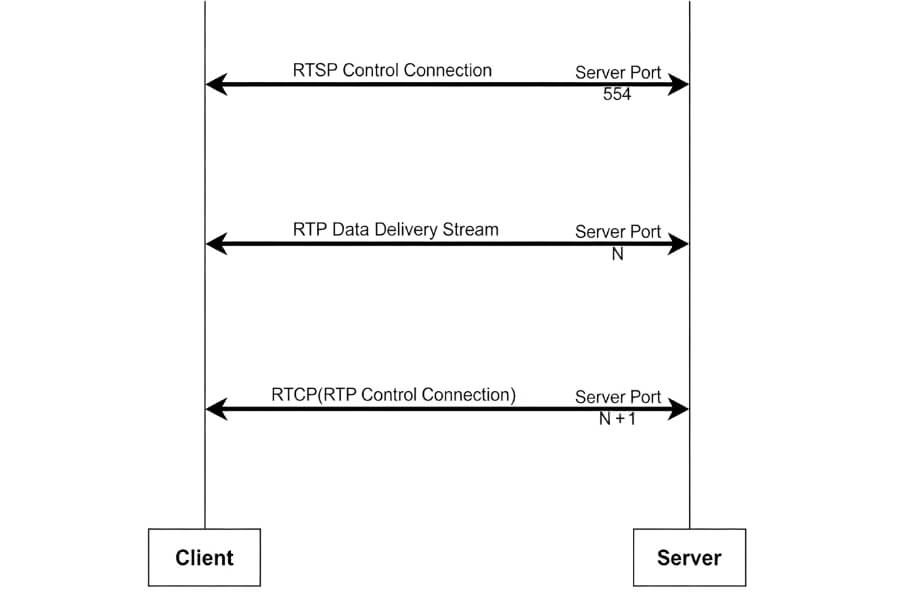
RTSP acts as a session controller rather than a data carrier. The actual audio and video streams are typically delivered through RTP, while RTCP handles quality feedback and synchronization.
From a functional perspective, RTSP works like a remote control for streaming sessions. This design makes it suitable for scenarios that require low latency and real-time interaction, such as video monitoring and live viewing.
How RTSP Controls Live Video Step by Step
An RTSP session follows a structured and predictable workflow.
Connection Setup
The client connects to the RTSP server using TCP or UDP, typically through port 554.
Session Description
The client sends a DESCRIBE request to obtain stream details, including codecs and available resolutions.
Transport Setup
A SETUP request defines how the stream will be delivered and which ports are used.
Playback Control
PLAY starts the stream. PAUSE temporarily stops it. TEARDOWN ends the session.
Media Transmission
While control commands flow through RTSP, the audio and video data are transmitted separately using RTP.
All of this happens in the background within milliseconds. For modern home users who rely on plug-and-play devices and mobile apps for real-time viewing, RTSP usually operates invisibly while enabling smooth live streaming.
Where RTSP Is Used in Real-World Systems
RTSP remains relevant because it solves specific real-world problems that other protocols cannot fully replace.
Video Surveillance and Security Systems
RTSP is most commonly used in IP-based surveillance. Cameras output real-time streams via RTSP to monitoring software, NVR systems, or third-party platforms for live viewing and recording.
In indoor environments, RTSP streams can be integrated into flexible smart indoor monitoring setups. Many indoor security camera systems use RTSP internally while offering simple app-based access to users.

Professional Live Production
RTSP is widely used in low-latency production workflows. Cameras can stream directly to software such as OBS Studio for live switching, recording, or broadcasting in controlled network environments.
Video Conferencing and Remote Collaboration
Some conferencing systems rely on RTSP to manage real-time audio and video sessions where precise control and synchronization are required.
Media Distribution in Controlled Networks
RTSP is also used in private networks for video-on-demand and internal streaming where latency and control are more important than browser compatibility.
Why RTSP Is Still Used in 2026
RTSP continues to be used because of several technical strengths.
Low Latency and Precise Control
RTSP enables near real-time streaming and supports commands such as pause, resume, and seek. This is critical for live monitoring, especially when immediate visual feedback matters.
RTSP is more commonly required in professional or multi-camera environments, where centralized management, third-party integration, or long-term recording is needed.
In typical home setups, especially with single indoor cameras, RTSP often runs in the background and does not require user interaction unless advanced integration is needed.
Broad Compatibility and Interoperability
As an open standard, RTSP works across vendors and platforms. It supports common codecs such as H.264 and H.265, allowing different devices and software to work together.
Network Flexibility
RTSP can operate over TCP for reliability or UDP for lower latency. It can also be combined with multicast to serve multiple clients efficiently.
Easy Integration into Existing Systems
RTSP is widely supported by cameras, media servers, and software libraries. For home users, this means that a wireless home camera may support RTSP in addition to app-based viewing, offering more flexibility without complicating daily use.
How RTSP Is Typically Set Up and Used
How to Find an RTSP Stream Address on Your Camera
Accessing an RTSP stream starts with obtaining the correct URL.
- Check the device manual or official specifications.
- Log in to the camera or NVR management interface and look for streaming or network settings.
- Use manufacturer-provided discovery tools when available.
- Refer to the common format: rtsp://username:password@ip-address:554/stream
For modern indoor cameras, RTSP settings are often available directly in the mobile app. This simplifies setup and supports easy home protection without advanced configuration.
Basic Steps for Using RTSP Streams
- Select a library Common options include GStreamer and Live555.
- Configure server and client Ensure the server publishes the stream correctly and the client handles RTSP commands properly.
- Test under real conditions Validate stability under different network loads and handle reconnection scenarios.
Important Security Considerations for RTSP
RTSP should always be secured when used beyond a trusted local network.
- Enable authentication with strong credentials.
- Encrypt control traffic using TLS where supported.
- Protect media streams with SRTP if required.
- Restrict access to RTSP ports through firewall rules.
FAQ
What is the difference between RTSP and HTTP streaming?
RTSP is designed for real-time session control with very low latency, making it suitable for live monitoring and professional environments. HTTP-based streaming formats such as HLS or DASH use segmented files, resulting in higher latency but broader compatibility with web browsers and large-scale internet distribution.
Is RTSP outdated in 2026?
RTSP is no longer the primary choice for public internet streaming. However, it remains widely used in video surveillance, professional production, and internal networks where low latency, precise stream control, and real-time interaction are required.
Do all network cameras support RTSP?
No. Some consumer-grade cameras rely on proprietary cloud protocols and do not provide RTSP access. Users who need RTSP should check the camera specifications carefully, especially when selecting indoor security cameras intended for third-party integration or local recording systems.
How are ONVIF and RTSP related?
ONVIF defines standards for device discovery, configuration, and control in security systems. RTSP is responsible for delivering the actual video stream. Many ONVIF-compliant cameras use RTSP as the underlying protocol for real-time video transmission.
Can RTSP streams be played directly in a browser?
Most modern web browsers do not support RTSP playback natively. RTSP streams are typically viewed using dedicated media players such as VLC or converted into HTTP-based formats like HLS through a media server for browser compatibility.
Can I use RTSP over the internet?
Yes, RTSP can be used over the internet, but it usually requires port forwarding, proper firewall configuration, and strong authentication. For security and reliability, RTSP is more commonly used within local or controlled network environments.
How do I find the RTSP address for my IP camera?
The RTSP address is usually listed in the camera’s user manual or network settings. It may also be available through the camera’s web interface, mobile app, or manufacturer discovery tools. The format typically includes the IP address, port number, and stream path.
RTSP in 2026 – What to Remember
RTSP continues to play an important role in real-time streaming where low latency and session control are essential. It remains a reliable foundation for surveillance systems, professional production, and integrated smart monitoring environments.
For indoor Wi-Fi cameras designed for simple installation and everyday use, RTSP support provides additional flexibility. Users can rely on mobile apps for daily viewing while retaining the option to integrate streams into broader systems when needed. Understanding when and how RTSP is used helps build more effective and confident streaming setups in 2026.